
Christmas product photos from one snapshot
Holiday, gift, evening and winter scenes for your listings.


Seven products, four holiday scenes
Holiday shot Festive evening Gift box Winter Gift set Holiday shot Toy Food gift Jewelry gift
About these shots
- Holiday shot
- Light holiday set: fir, kraft paper, soft fairy lights.
- Festive evening
- Dark backdrop and warm lights, the product still crisp.
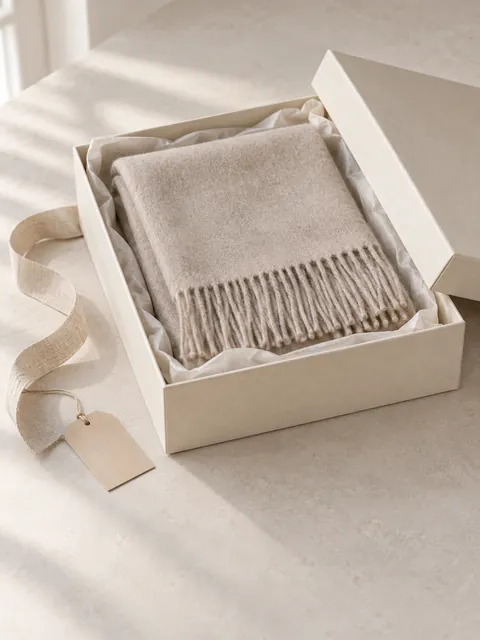
- Gift box
- Open box, tissue paper, a blank tag.
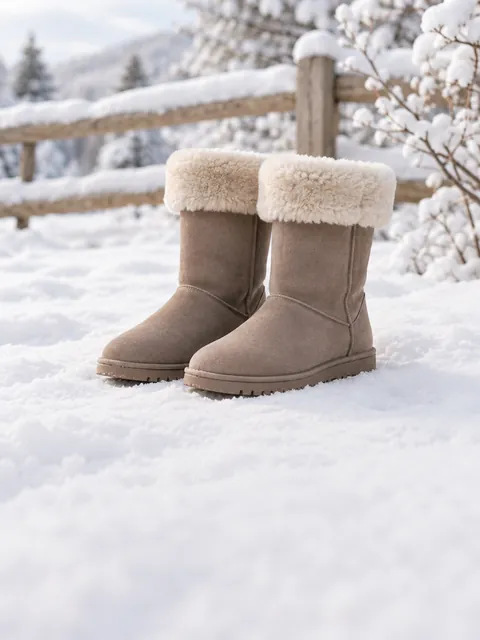
- Winter
- Fresh snow in soft daylight for things worn outdoors.
- Gift set
- A set reads as one present.
- Holiday shot
- The same set in the light holiday scene.
- Toy
- Bright toys stay true to color.
- Food gift
- Crumbs and the dish towel are gone, the tin pattern stays.
- Jewelry gift
- Small items get a box and a ribbon for scale.
The before photos on this page are generated stand-ins for a seller’s phone snapshot. Each result is the named Sweepshot scene applied to that snapshot, with no retouching afterwards.
The holiday scenes


About these scenes
Pick two or three and they run as one series from the same photo. The scenes are light and modern: pale linen, kraft paper, fir and soft lights, with no glitter or dark luxury styling.
Seller calendar 2026
- Nov 27Black Friday
- Nov 30Cyber Monday
- Dec 17USPS Ground Advantage
- Dec 19Priority Mail Express
Full calendar and sourcesChecked 27 October 2026
Update listing photos before the November traffic, then keep the holiday images up until the last shipping date for your carrier.
| Date | What | For your photos |
|---|---|---|
| By Nov 10 | Holiday images live | Our suggestion: shoppers start gift searches in November, so new photos should already be indexed. |
| Nov 26 | Thanksgiving | Last quiet days to swap images before the sales rush. |
| Nov 27 to 30 | Black Friday to Cyber Monday | Sale banners belong in your shop or ads. Keep listing photos free of added sale text. |
| Dec 4 to 12 | Hanukkah | A gift or winter scene fits better than a Christmas tree. |
| Dec 17 | USPS Ground Advantage and First-Class Mail | Recommended send-by date for delivery by Dec 25 in the contiguous US. |
| Dec 18 | USPS Priority Mail | Recommended send-by date. |
| Dec 19 | USPS Priority Mail Express | Recommended send-by date. After it, say in your listings that delivery by Dec 25 is not guaranteed. |
| Early January | Swap back | Return to your everyday images; keep the winter shot for cold-weather items. |
USPS dates are recommendations for the contiguous United States; Alaska, Hawaii and territories have an earlier Ground Advantage date (Dec 16). Thanksgiving and Black Friday follow the calendar.
Checked on 27 October 2026 against USPS 2026 holiday shipping deadlines. Marketplaces change their rules; check your category before you publish.
Where a holiday photo can go
- AmazonSecondary images
- EtsyAny slot
- eBayAfter a clean first photo
- Your shopAnywhere
Rules by marketplaceChecked 27 October 2026
| Where | Holiday scene | Keep in mind |
|---|---|---|
| Amazon | Not the main image | The main image stays on pure white with no props. Holiday scenes work in the other image slots. |
| Etsy | Any slot | Since 22 October 2026 Etsy also asks for at least one unedited photo of the actual item; keep one real photo in the set. |
| eBay | After a clean first photo | eBay recommends an uncluttered, neutral backdrop. Lead with a clean photo and add the holiday shot after it. |
| Your own store | Anywhere | Use the same scene for every product in a gift collection so the grid looks planned. |
Decorations in a scene are not part of the purchase. Say so in the description when a shopper could think the fir or the box is included.
Checked on 27 October 2026 against Amazon's image requirements post in Seller Forums, Etsy's AI update for sellers and eBay: Adding pictures to your listings. Marketplaces change their rules; check your category before you publish.
A holiday shot list
01
Keep the clean main photo
White or plain first image for search; the holiday scene goes second or third.
02
One gift shot
Gift scene: the product in an open box with tissue paper and a blank tag. Works for jewelry, beauty, mugs and food.
03
One mood shot
Festive evening for candles, lamps and anything that glows; Holiday shot for everything else.
04
Winter for things worn outside
Boots, hats, scarves and gear on fresh snow in daylight.
05
Show the whole set
Bundles and gift sets in one frame so the buyer sees every piece.
06
Check the details
Zoom in on labels, stones, glaze and stitching: they should match the item you ship.
07
Swap back in January
Holiday images look dated after New Year. Keep the files for next season.

Questions
When should I update listing photos for Christmas?
Aim to have holiday images live by about November 10. Holiday shopping picks up through November, and new images need time to show up in marketplace and Google image results. Keep them until your last shipping date, then switch back in early January.
Can my Amazon main image be a Christmas scene?
No. Amazon’s main image stays on a pure white background with only the product in the frame. Put the holiday scene in one of the other image slots.
Do I need to say the decorations are not included?
It is good practice. The fir, ribbons and gift boxes in a scene are styling, so add a short line to the description, for example “Props not included”.
Which scene fits Hanukkah or a general winter sale?
Use the Gift or Winter shot scene. Both have no Christmas tree, so they work for any December gift and for cold-weather items into February.
Will the product change in a holiday scene?
The scene is built around your photo and asks the model to keep the product exactly as it is: shape, color, label and details. Compare small details with the item before you publish, as you would with any edited photo.
Can I make several holiday shots at once?
Yes. Pick two to four holiday scenes before you start and they run as one series from the same photo, so a gift shot and an evening shot come out together.
What size are the photos?
Scenes come out in 3:4 portrait or square, depending on the frame you choose before generating. Use the marketplace image resizer if your template needs an exact pixel size.
